

Features

Underwrite, manage, and close. All in one app.

ROIStack is the deal operating system that replaces your calculator, your CRM, and your share-PDF workflow with a single workspace built around the deal.

Omni-View + Sticky KPI HUD

One address, four strategies, scored at the same time.

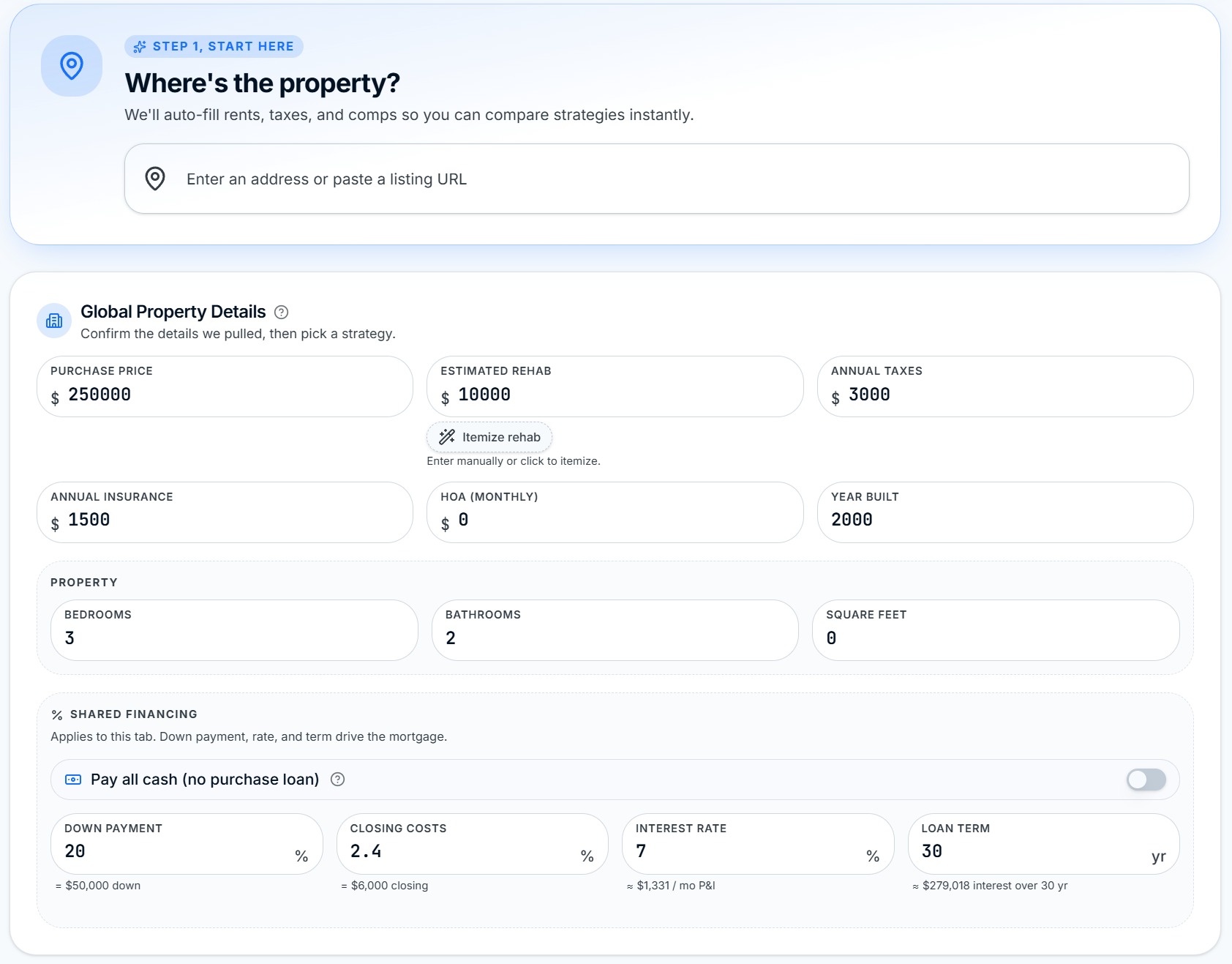
Enter the property once. ROIStack scores it as LTR, STR, Flip, and BRRRR side by side. A Sticky KPI HUD pins your score, cash flow, and CoC at the top while you change inputs so you never lose sight of the deal.
  • Switch strategies instantly with zero re-entry
  • Sticky KPI HUD stays pinned while you scroll and edit
  • Compare scores side by side, color-coded by tier
ROIStack Omni-View Step 1: Where's the property, with Global Property Details and Shared Financing pre-filled

One property, four strategies scored side by side.
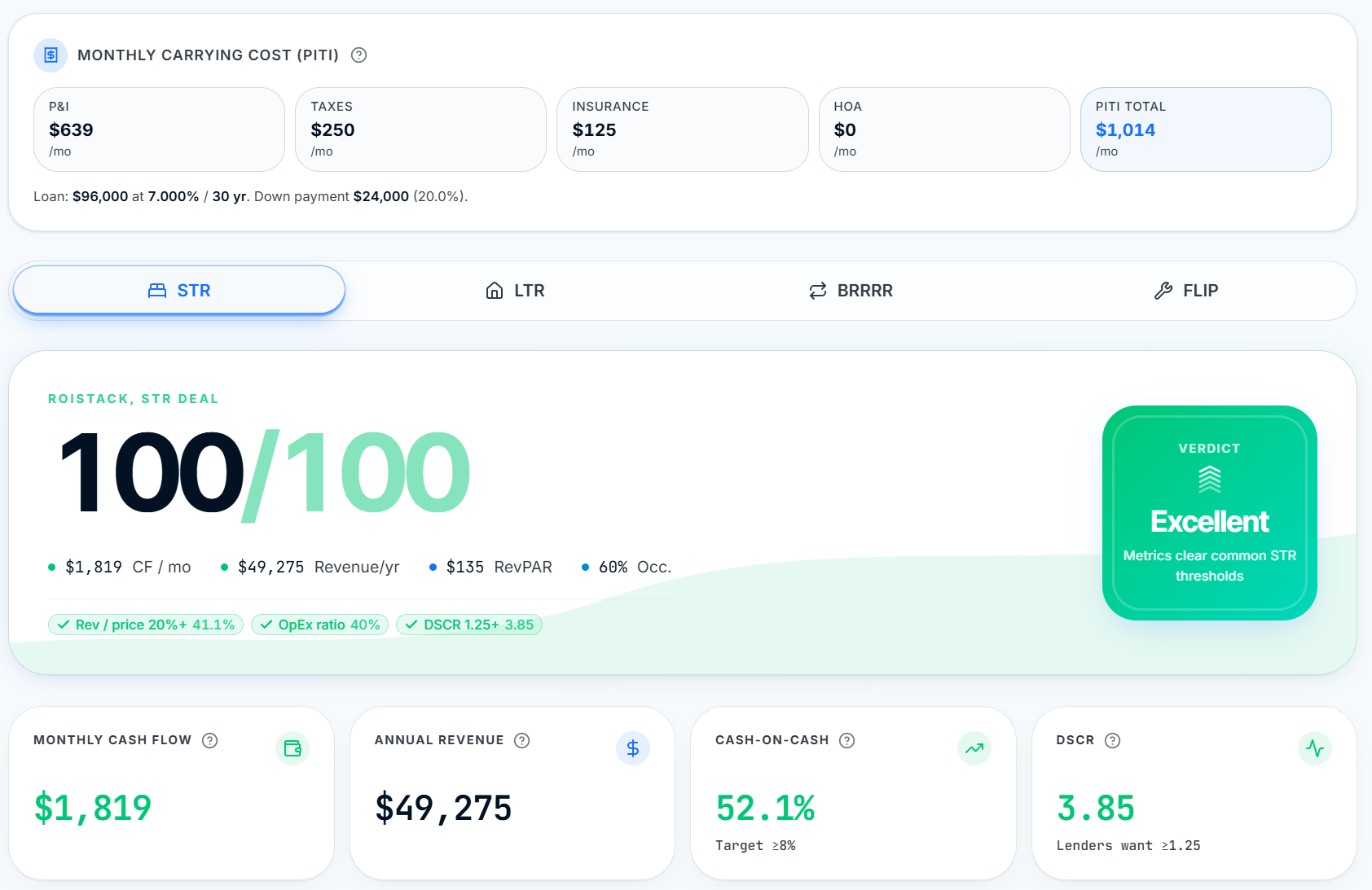
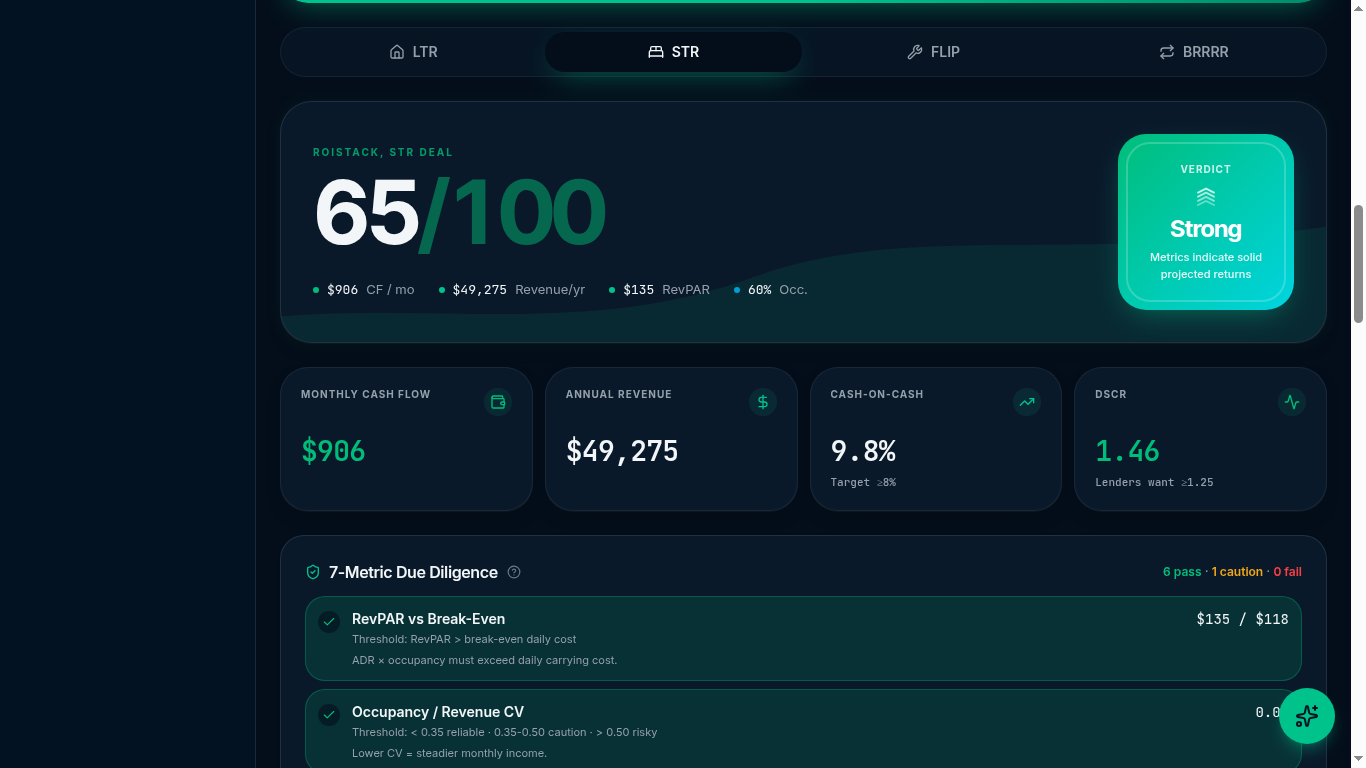
ROIStack Omni-View STR tab scoring 100/100 with PITI carrying cost, verdict card, and cash flow, revenue, CoC, and DSCR tiles

Sticky KPI HUD keeps your score and cash flow pinned as you edit.

Dealy AI Assistant

A deal breakdown before you type a single question.

Open Dealy and it greets you with a deterministic, math-based comparison of all four strategies for the deal in front of you. Suggested questions help you go deeper on what matters. No empty chat box, no guesswork.
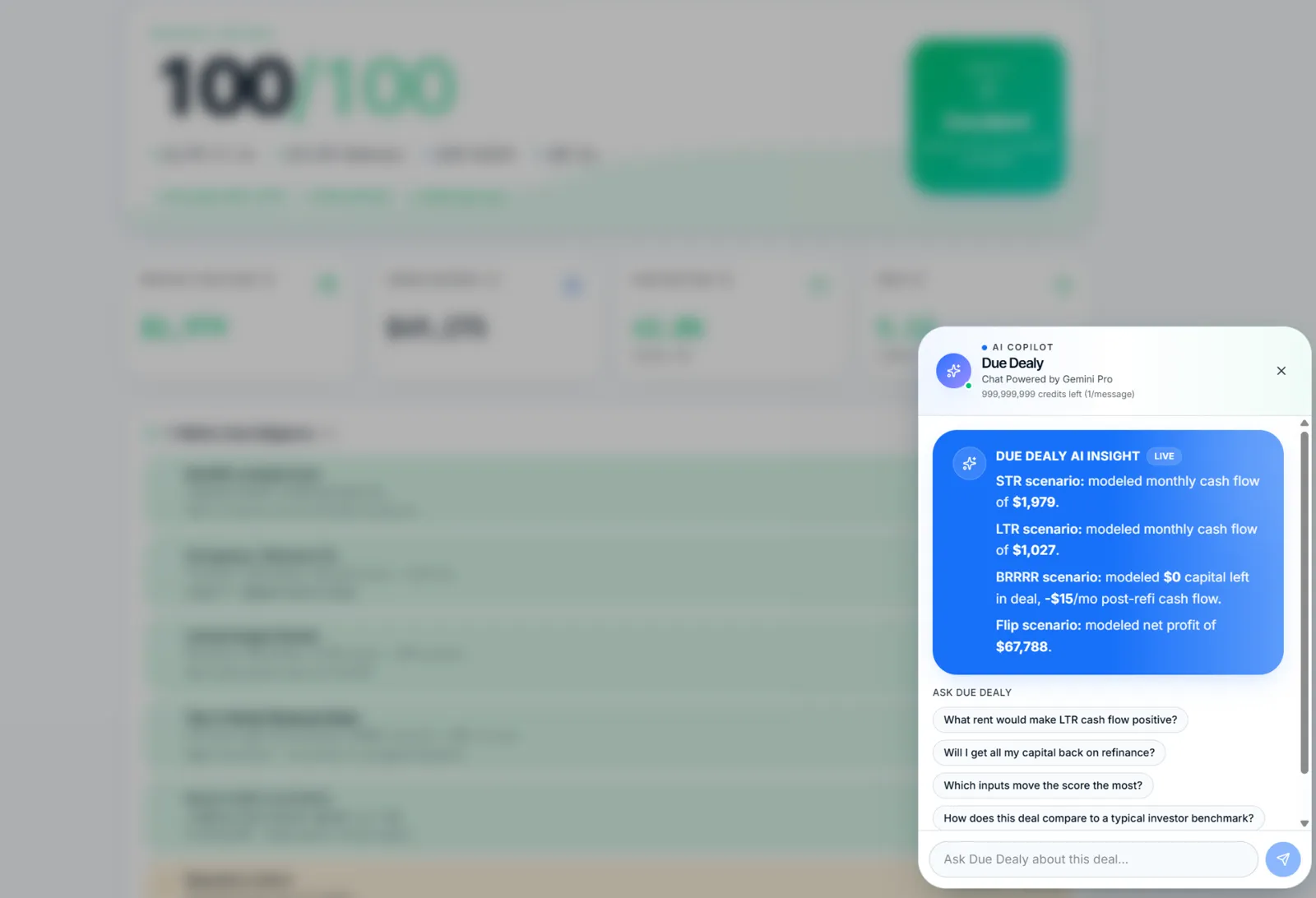
  • Proactive opening insight: STR, LTR, BRRRR, Flip compared at a glance
  • Suggestion chips tailored to the active deal
  • Grounded in your actual numbers, not generic advice
Dealy AI Assistant drawer showing the proactive 4-strategy deal insight card and suggested-question chips
Pipeline Deal Hub

A real CRM for the deals you actually work.

Move any saved deal onto the Pipeline Kanban. Tap a card to slide open the Deal Hub Drawer: stage, task checklist, notes, quick metrics, and a one-tap jump back into Omni to keep underwriting.
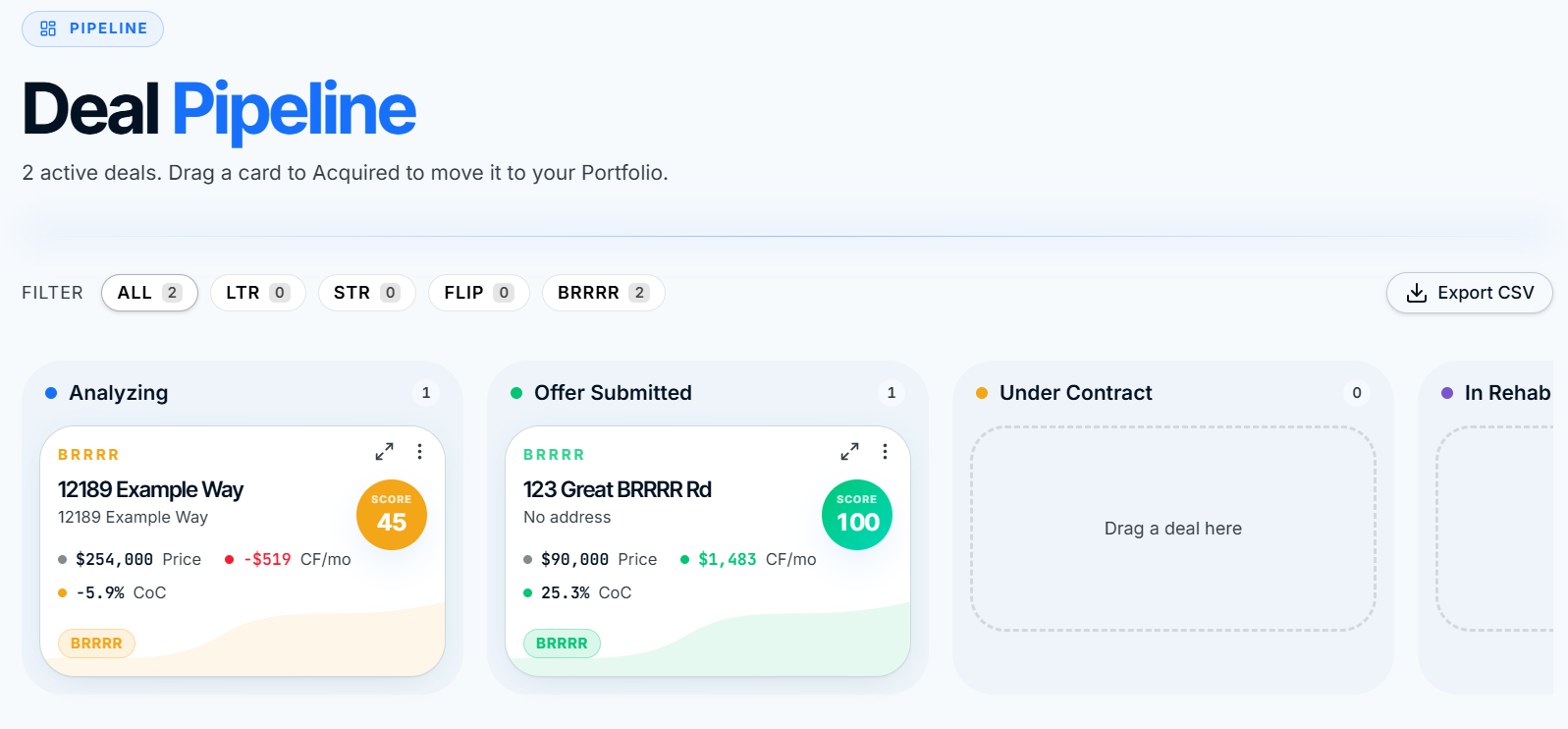
  • Kanban stages: Analyzing, Offer Submitted, Under Contract, In Rehab, Completed, Sold
  • Deal Hub Drawer with tasks, notes, and stage selector
  • Edit Underwriting button reopens the deal in Omni without losing context
  • 30-day Trash recovery on every deleted deal
ROIStack Pipeline Kanban with Analyzing, Offer Submitted, Under Contract, and In Rehab columns
Read-Only Share Links

A share link your lender will actually open.

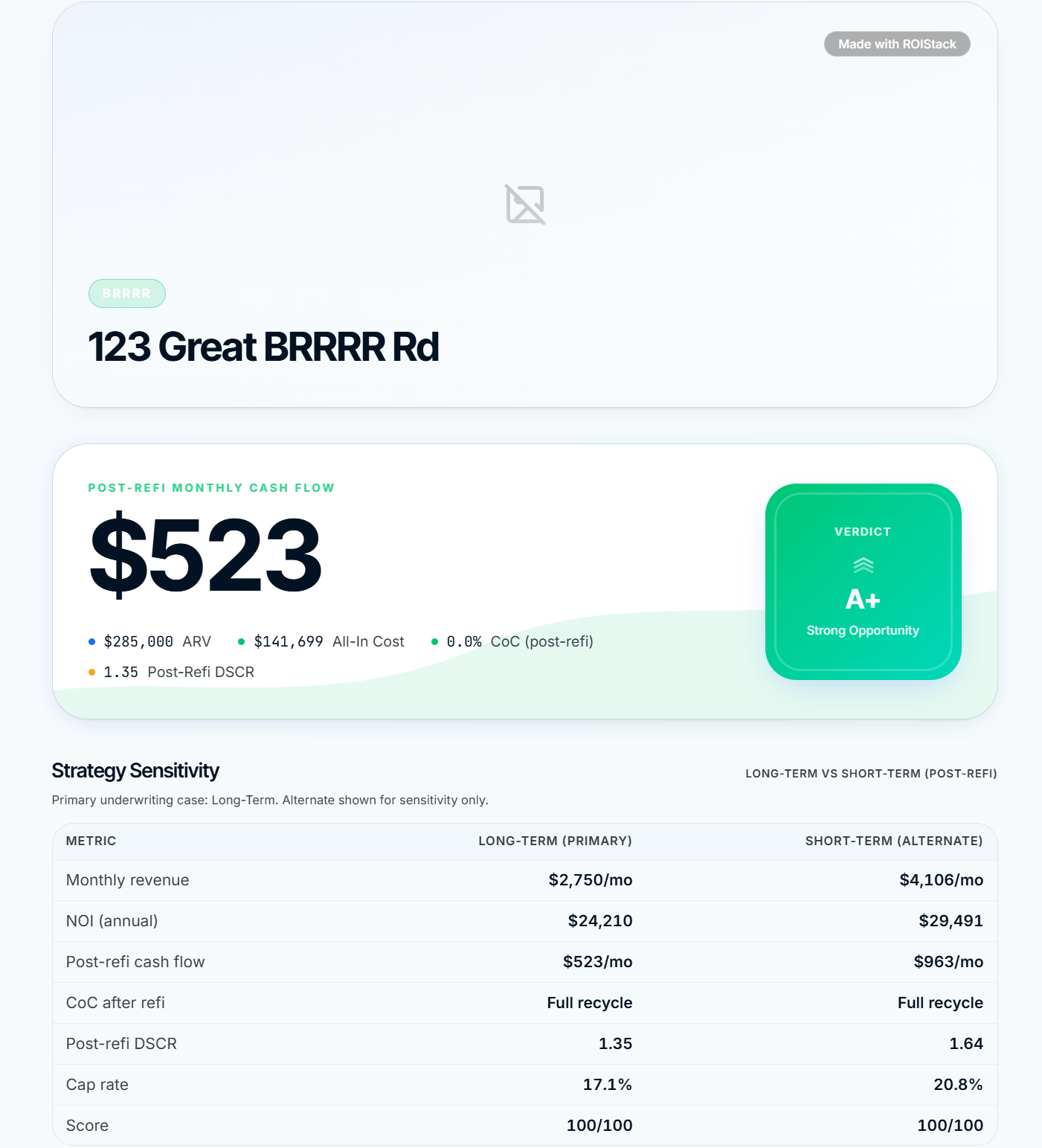
Publish any saved deal as a read-only web link in one click. Your lender or partner sees the score, cash flow, and key metrics without ever logging in.
  • Read-only web view, no login required
  • Free and Starter: up to 3 active links. Pro and Investor: unlimited
  • Manage every active link from one drawer, disable instantly
ROIStack read-only share link showing the deal score, verdict, and strategy sensitivity

Public deal view. Score, verdict, and post-refi cash flow at a glance.
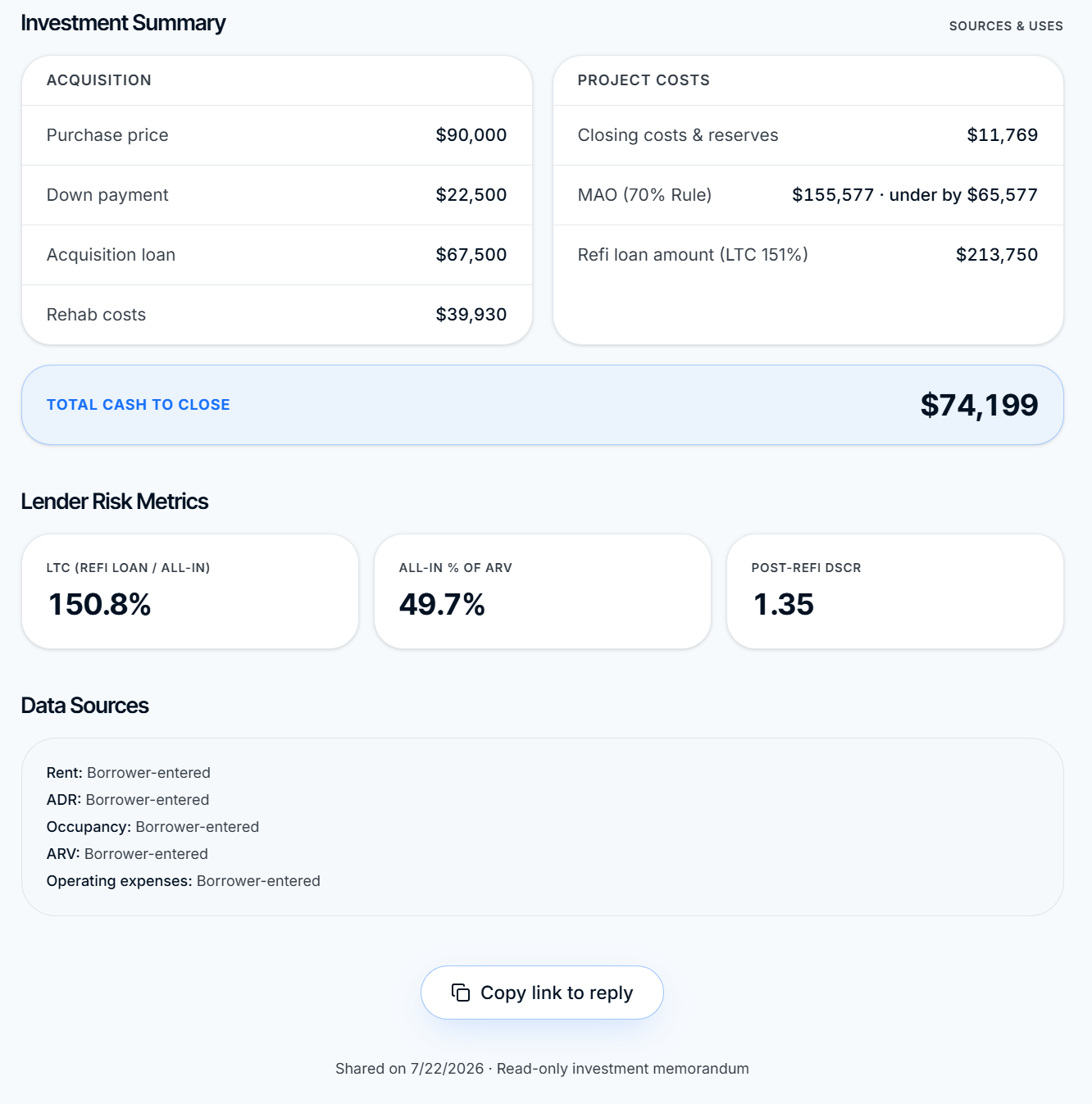
ROIStack share link management drawer with copy, open, and disable actions

Manage every active link. Copy, open, or disable in a single tap.

BRRRR Timeline

Model the whole BRRRR. Acquisition to refi to cash flow.

A chronological workspace built the way the strategy actually runs. Phase 1 sets your MAO and holding costs. Phase 2 models the refi and capital left in the deal. Phase 3 runs post-refi ops as long-term rent or short-term with peak/off-peak modeling.
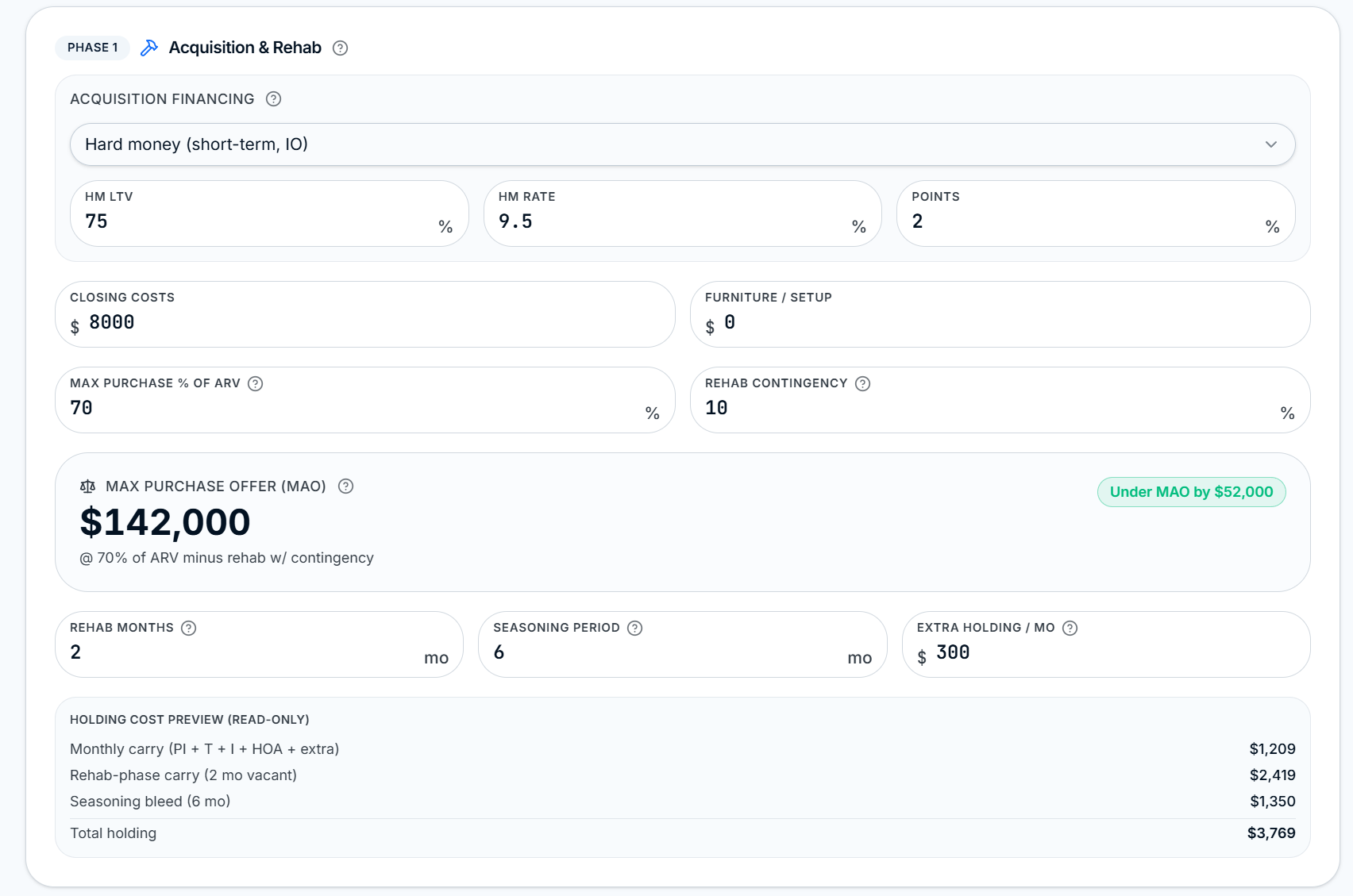
BRRRR Phase 1 Acquisition and Rehab with hard money inputs, MAO calculation, and holding cost preview
Phase 1

Acquisition & Rehab

Hard money, closing, MAO, seasoning, and holding bleed. See if you are under MAO before you offer.
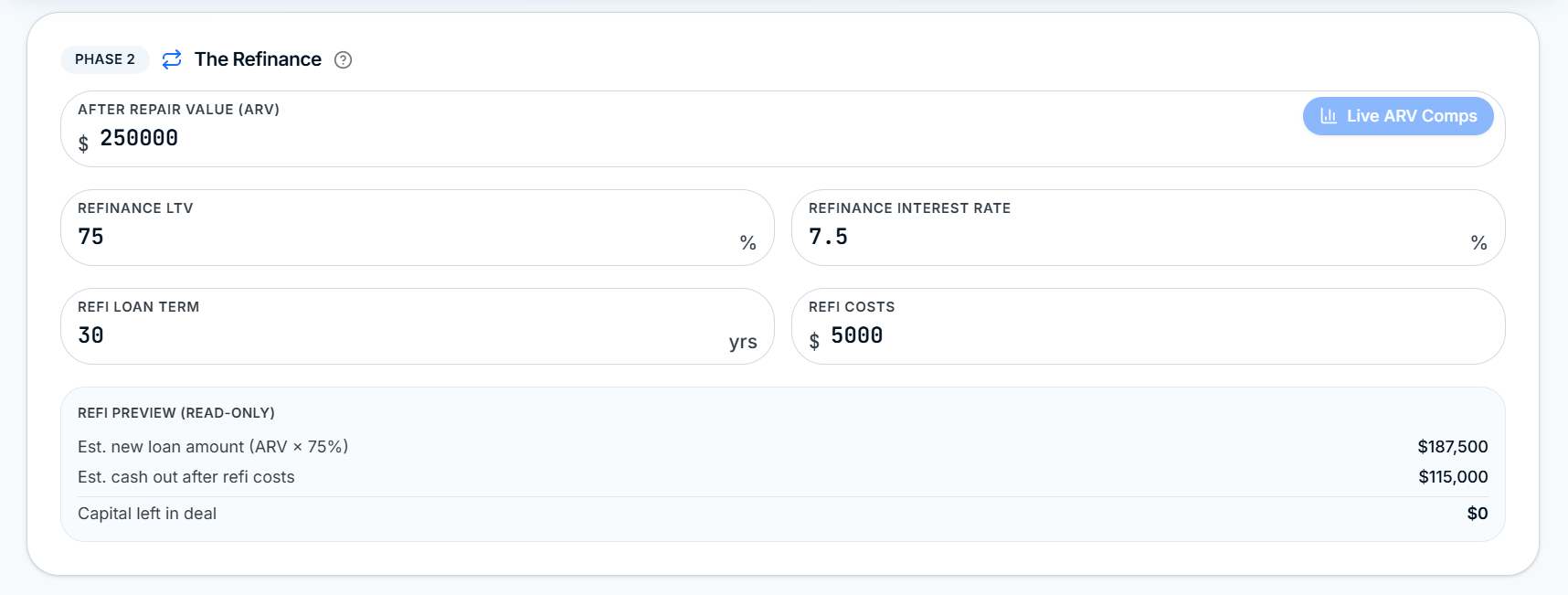
BRRRR Phase 2 Refinance modeling with ARV, refi LTV, and capital-left-in-deal preview
Phase 2

The Refinance

ARV with live comps, refi LTV and rate, refi costs. Instantly see cash out and capital left in the deal.
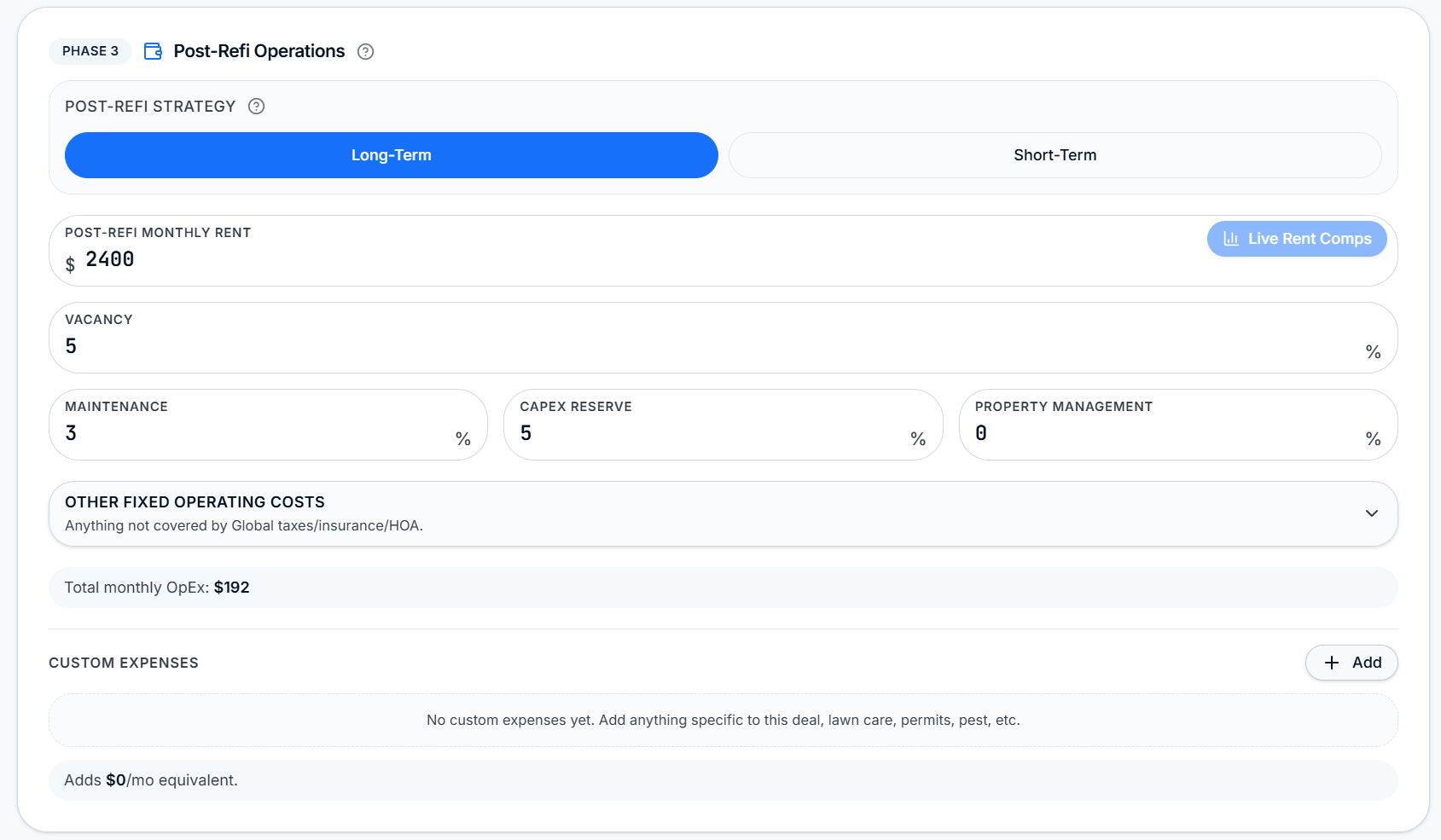
BRRRR Phase 3 Long-Term post-refi operations with rent, vacancy, and reserve inputs
Phase 3 · Long-Term

Post-Refi as LTR

Rent, vacancy, maintenance, capex, PM. Live rent comps pinned right next to the input.
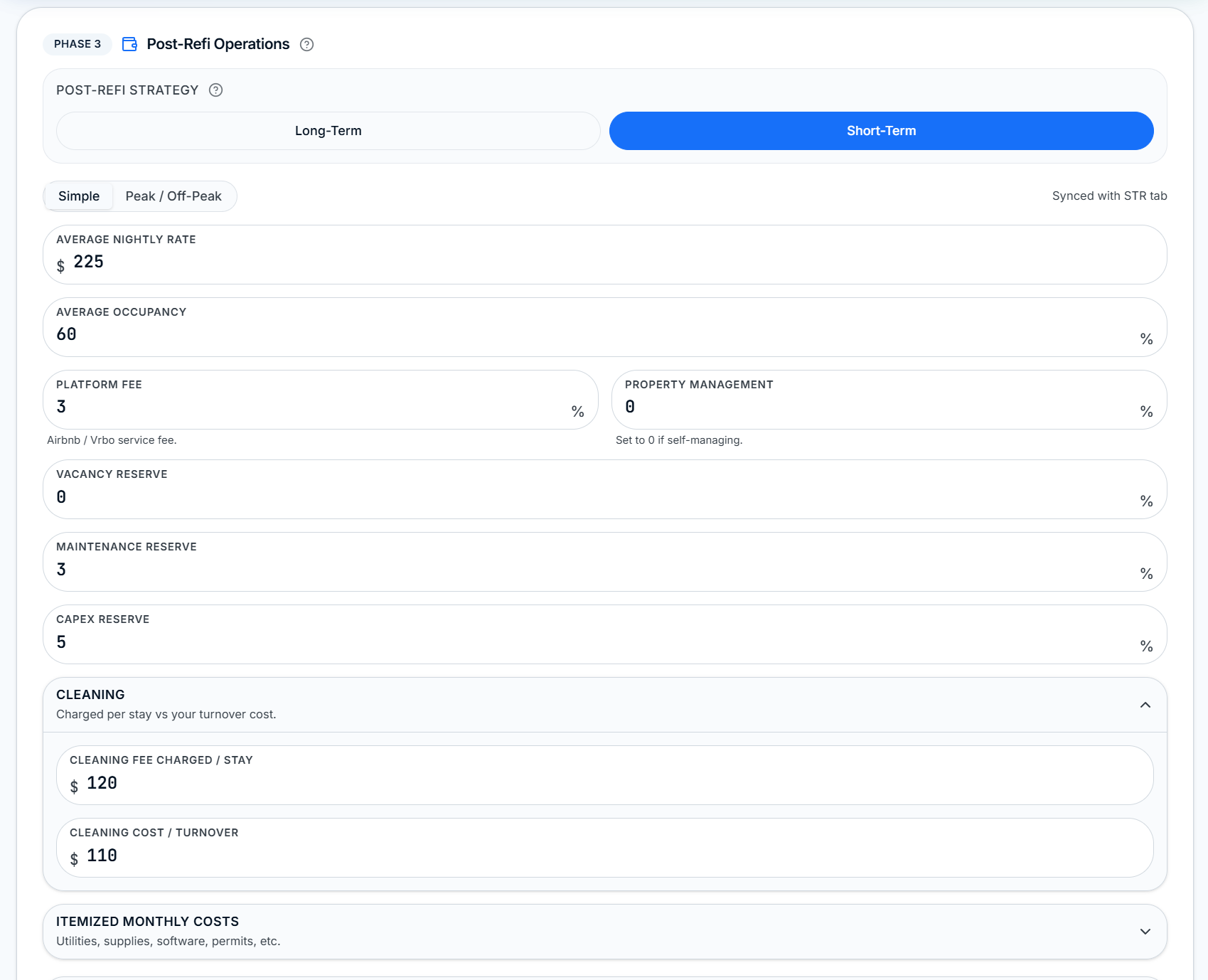
BRRRR Phase 3 Short-Term post-refi operations with nightly rate, occupancy, and cleaning inputs
Phase 3 · Short-Term

Post-Refi as STR

Nightly rate, occupancy, platform fees, cleaning per stay vs turnover cost, itemized monthly costs.

Portfolio and Ownership Ops

A live operations layer for every property you own.

Move a deal from Pipeline to Portfolio, or use the Add Existing Property wizard to inject something you already own. Every asset gets its own Ownership page with real leases, expenses, key dates, and an Actual vs Projected verdict. Everything rolls up into a dashboard built for after you close.
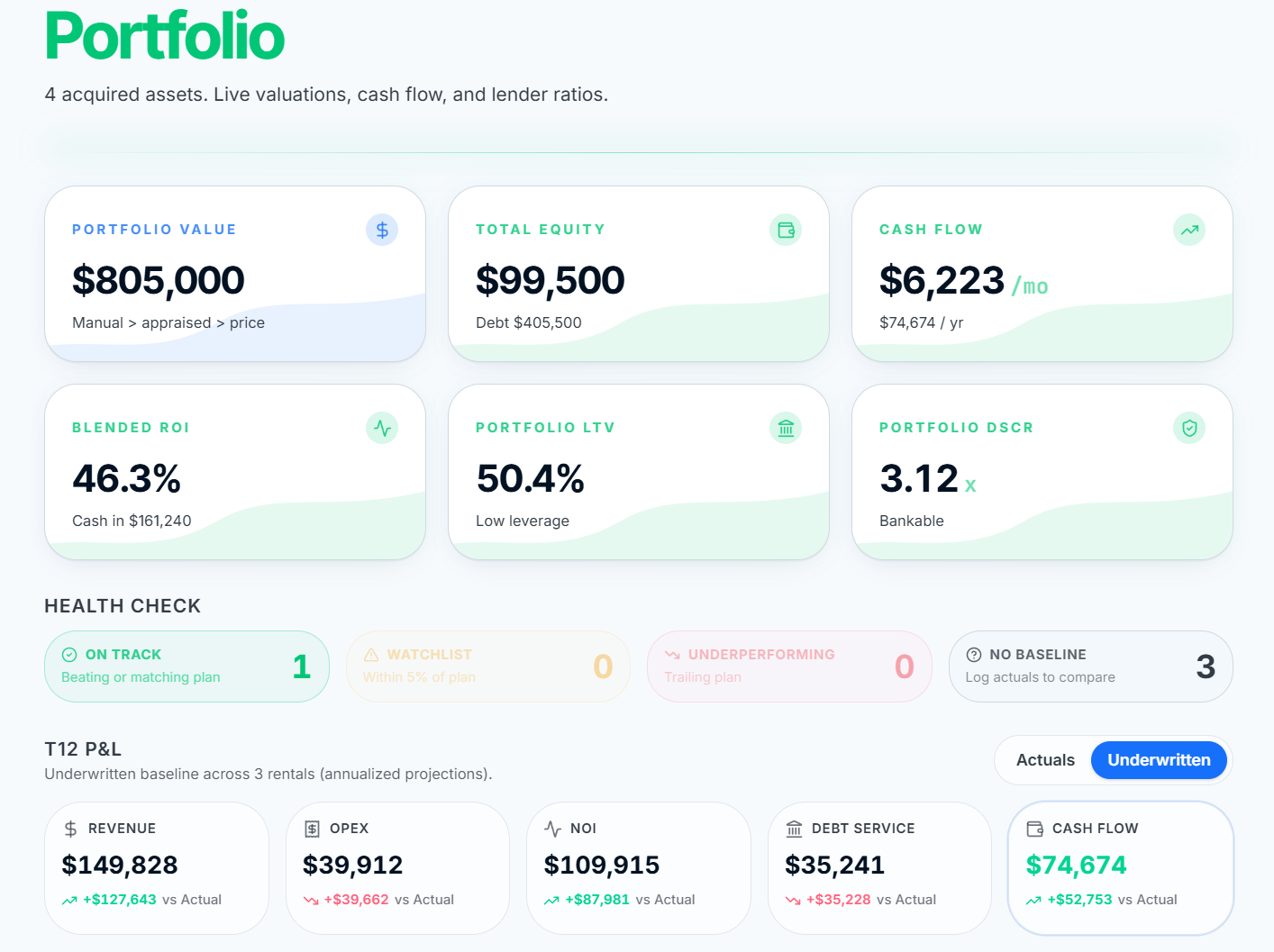
  • Quick-Add Existing Asset wizard, 3 steps, multi-family 1 to 4 units
  • Actual vs Projected card with Original / Adjusted baseline toggle
  • Recurring expenses engine plus a one-off expenses ledger
  • T12 P and L strip, expense donut, verdict pills, sort, search, pagination
  • Branded Portfolio and single-property PDF reports for lender packets
ROIStack Portfolio dashboard with aggregate KPI strip, verdict pills, and owned property cards
Rehab SoW Builder

A contractor-grade scope of work, priced to your ZIP.

53 line items across demo, roofing, exterior, windows, kitchens, baths, mechanicals, and finishes. Toggle items on and the Rehab Snapshot updates live: Baseline plus Scope plus Value-Add equals Total Rehab. Projected ARV, total cash needed, and finish tier all recalculate in one click.
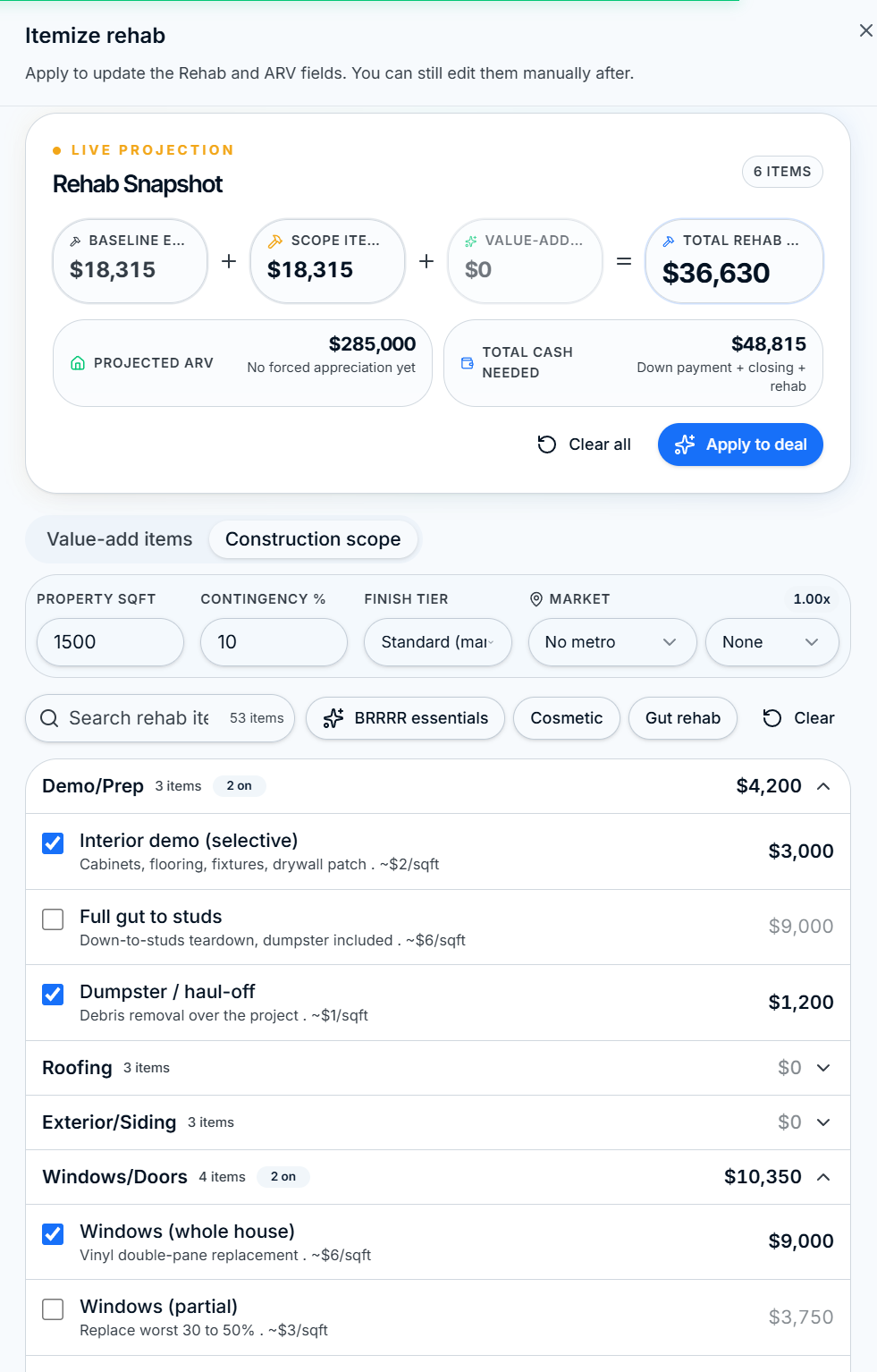
  • Live Rehab Snapshot: Baseline + Scope + Value-Add = Total, with Projected ARV and cash needed
  • Finish tier and metro cost multipliers, plus BRRRR essentials, Cosmetic, and Gut rehab presets
  • Selections persist per property and apply straight into the Omni-View rehab and ARV fields
ROIStack Rehab SoW Builder with the Rehab Snapshot showing Baseline, Scope, Value-Add, Total Rehab, Projected ARV, and Total Cash Needed
Live Comps Drawer

Rent, ADR, and ARV comps pulled in one click.

Open the drawer right next to any rent, nightly rate, or sale-price input and see live comparable properties with match scores, distance, and filters. Refresh straight from Rentcast or AirROI without leaving the analyzer.
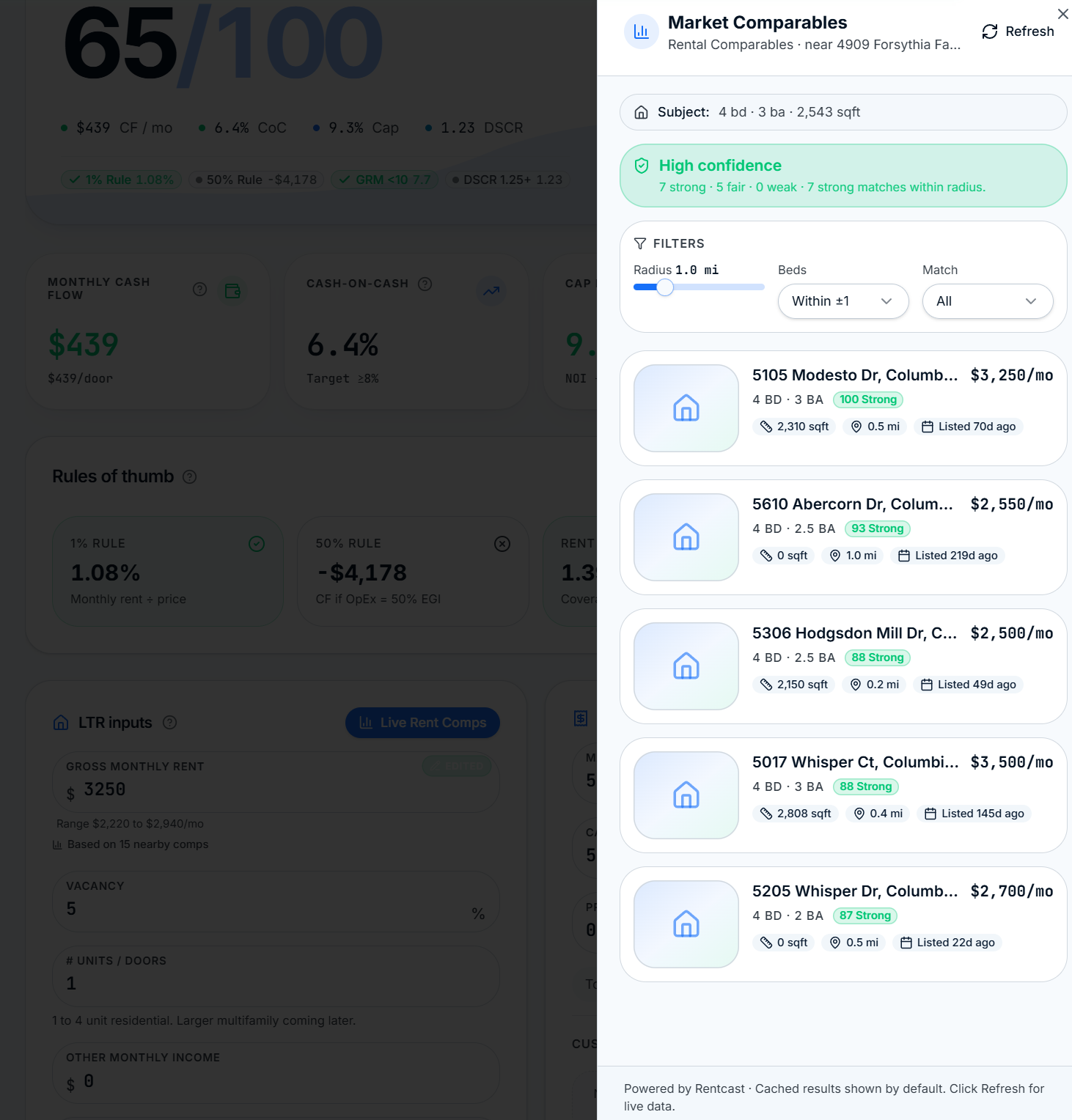
  • Live long-term rent comps with median, confidence, and radius filters
  • Short-term ADR comps powered by AirROI
  • Sales/ARV comps for Flip and BRRRR exit valuation
  • One-click refresh to live data where available
ROIStack Live Rent Comps drawer showing comparable rental listings, match scores, filters, and Refresh

Live long-term rent comps. Median, confidence, and radius filters for LTR analysis.
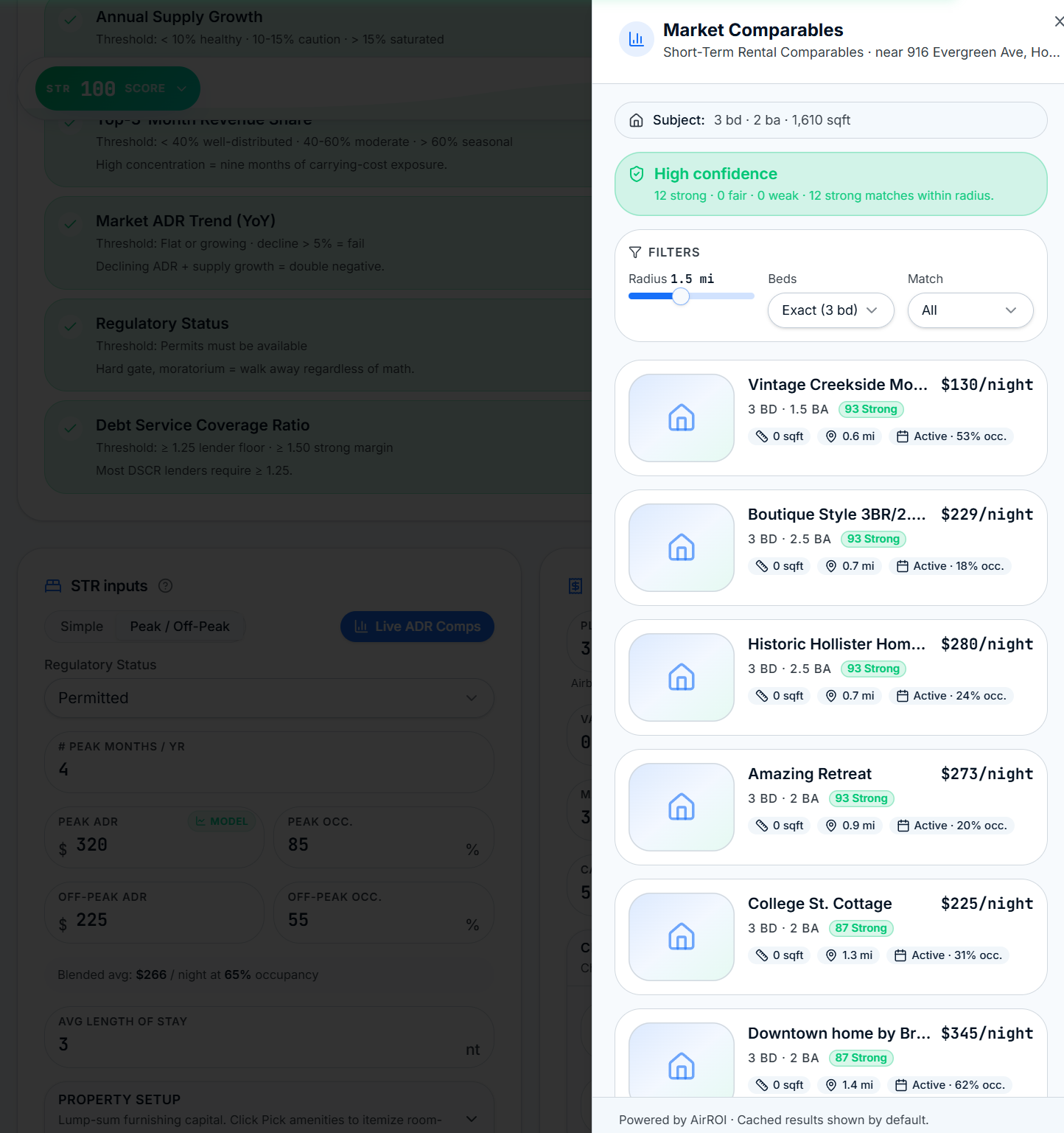
ROIStack Live ADR Comps drawer showing short-term rental comparables with nightly rates, occupancy, and match scores

Live ADR comps. Nightly rate, occupancy, and match strength for every STR nearby.
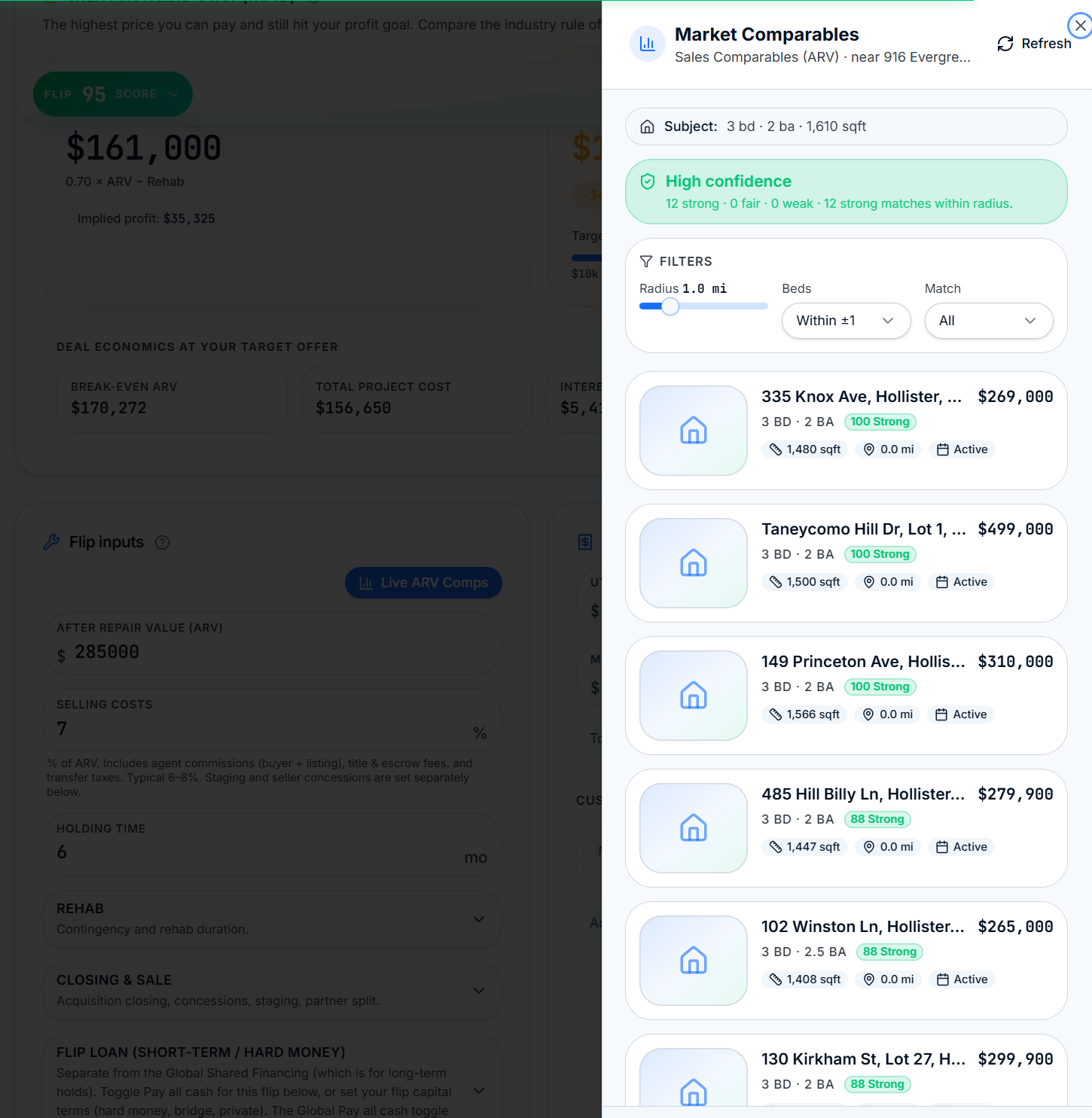
ROIStack Live ARV and sales comps drawer with recent sale prices, square footage, and match scores

Live sales/ARV comps. Recent transactions to anchor your Flip or BRRRR exit value.

7-Metric Due Diligence

Seven hard gates before you ever wire earnest money.

Every STR deal runs through a deterministic 7-metric gauntlet. RevPAR vs break-even, occupancy CV, annual supply growth, top-3-month revenue share, market ADR trend, regulatory status, and DSCR. Each metric shows the threshold, your value, and a pass/caution/fail chip so you know exactly where the risk lives.
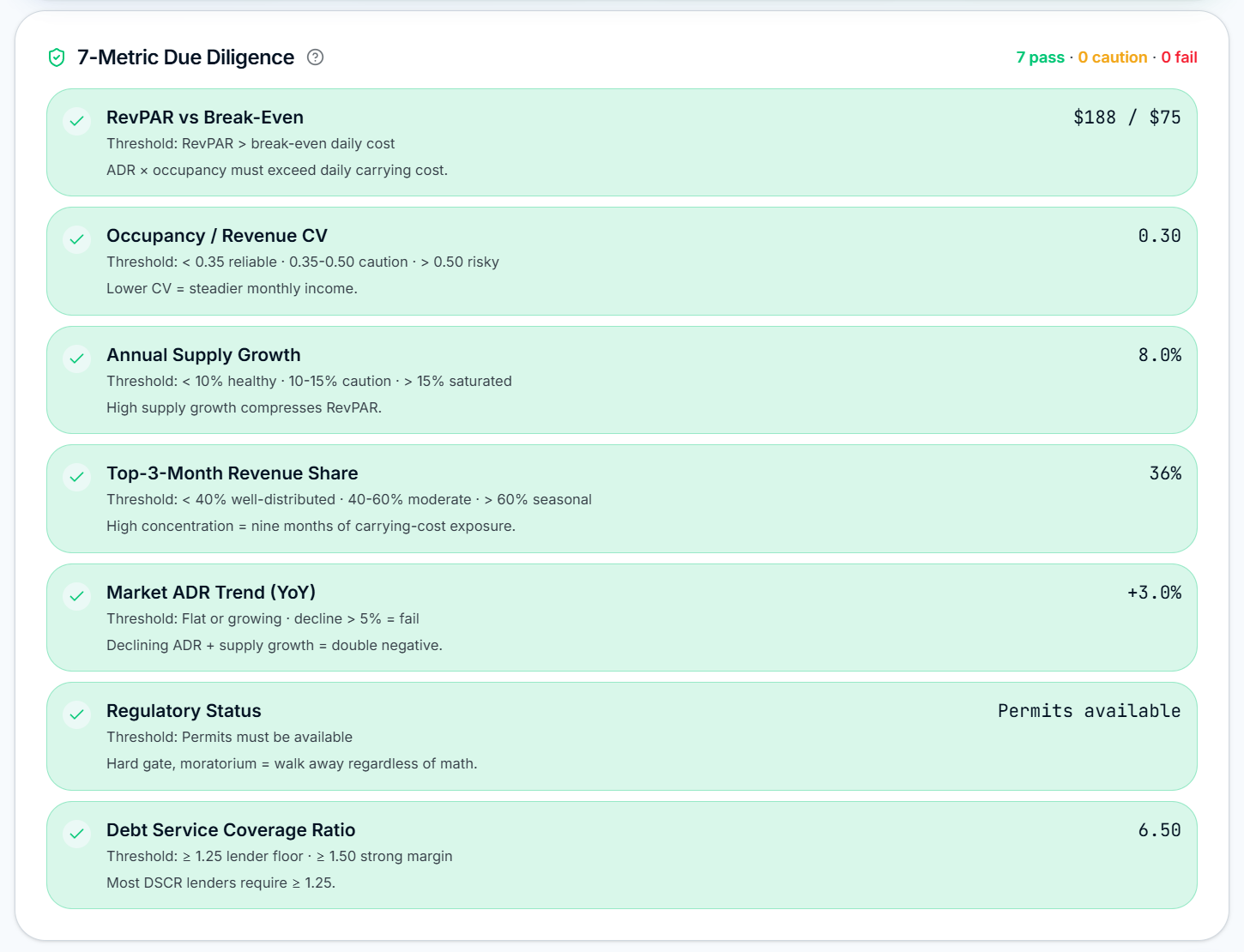
  • Hard-coded thresholds, no vibes, no hidden fudge factors
  • Instant pass/caution/fail summary at the top of the card
  • Explanations under every metric so partners know why it matters
ROIStack 7-Metric Due Diligence card showing RevPAR vs break-even, occupancy CV, supply growth, seasonality, ADR trend, regulatory, and DSCR with pass chips
Side-by-Side Compare

Compare deals with a real portfolio roll-up on top.

Select any saved deals and ROIStack lines them up metric by metric with a Portfolio Roll-up header: total price, total cash in, combined cash flow, and blended CoC. Per-row winners are highlighted so the better deal is obvious at a glance.
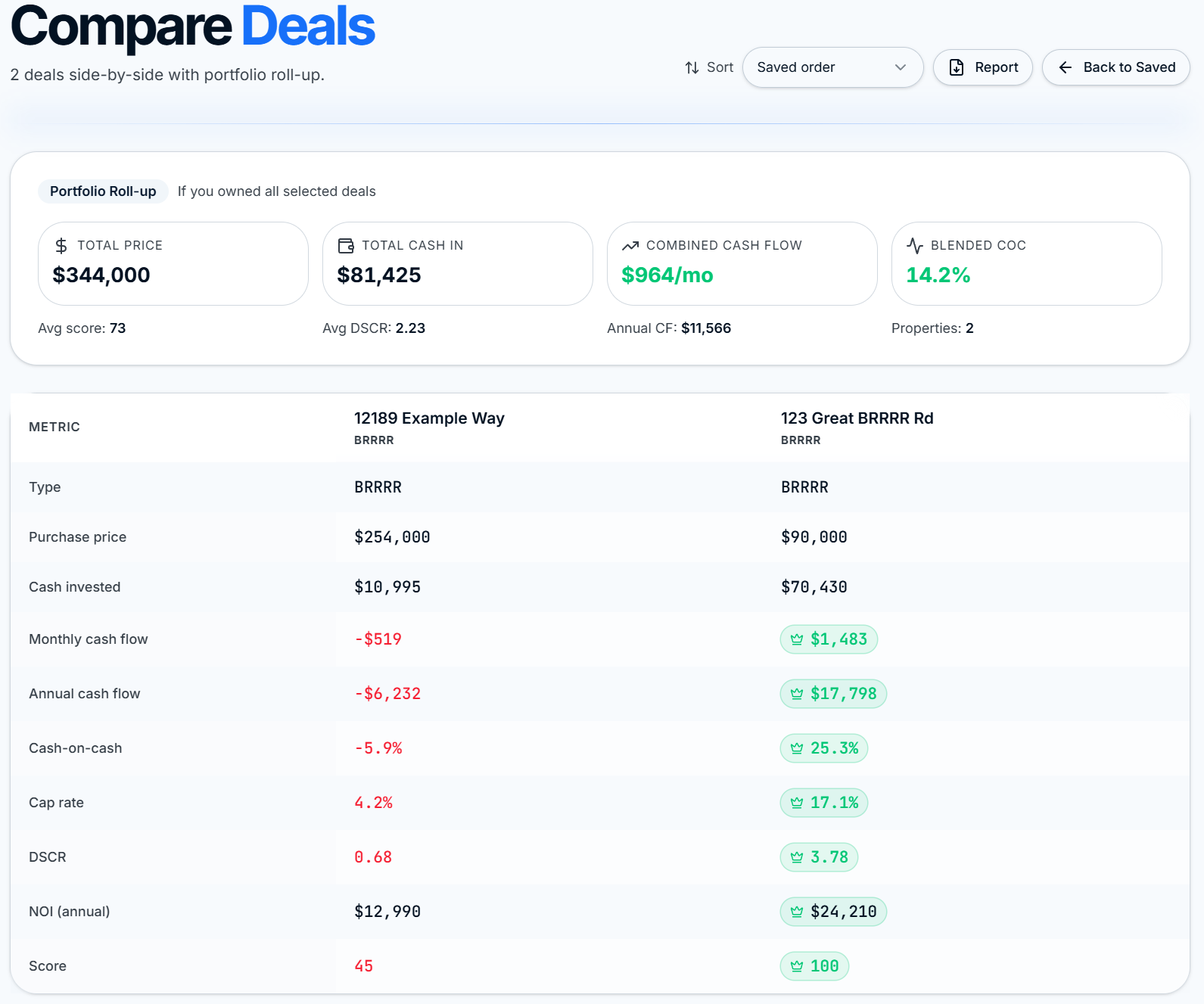
  • Portfolio Roll-up: total price, cash in, combined CF, blended CoC, avg DSCR
  • Per-metric winner chips across purchase price, cash flow, CoC, cap rate, DSCR, NOI, score
  • Export the comparison to a branded PDF report in one click
ROIStack Compare Deals view with Portfolio Roll-up header and side-by-side metrics for two BRRRR deals, winners highlighted
Saved Library

Every deal you've touched, synced and searchable.

Your Saved Library is the working set of every property you've analyzed. Rule-of-thumb chips, cash flow, CoC, and score sit right on the card. Move to Pipeline, Publish a read-only link, or open in Omni without leaving the list. Deletes go to Trash for 30 days.
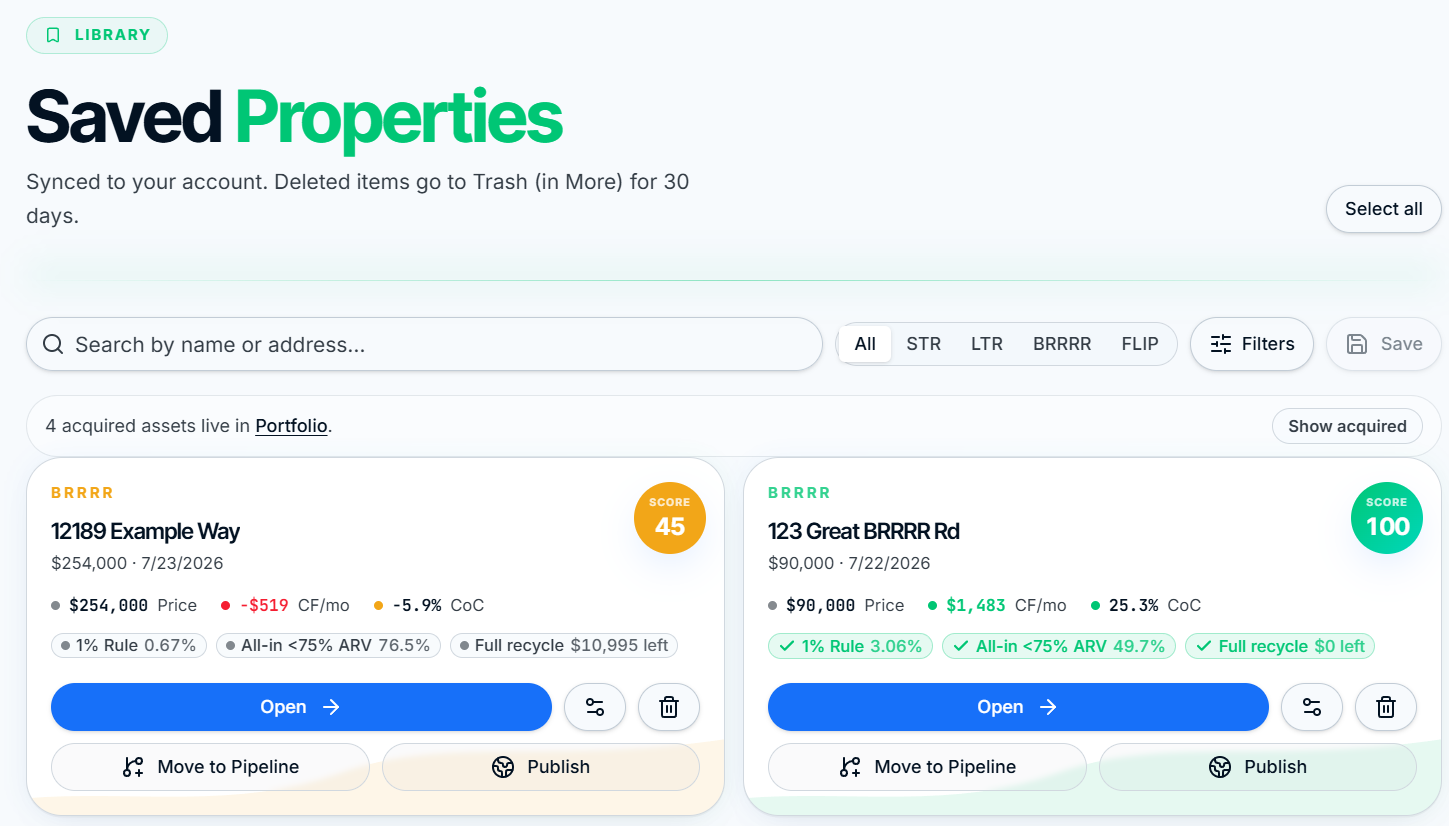
  • Rule-of-thumb chips: 1% Rule, All-in <75% ARV, Full Recycle status
  • Filter by strategy, search by name or address, bulk select
  • Move to Pipeline or Publish a share link straight from the card
  • Acquired assets roll into Portfolio automatically. 30-day Trash on every delete
ROIStack Saved Properties library with rule-of-thumb chips, cash flow, CoC, and Move to Pipeline and Publish actions
Ownership Page

A live command center for every property you own.

Click any asset in Portfolio and land on a full ownership surface: Actual vs Projected, monthly costs, rent collection, leases, debt service with PITI escrow, recurring bills, expense ledger, key dates, and contacts. Every payment marked flows back into the portfolio rollup automatically.
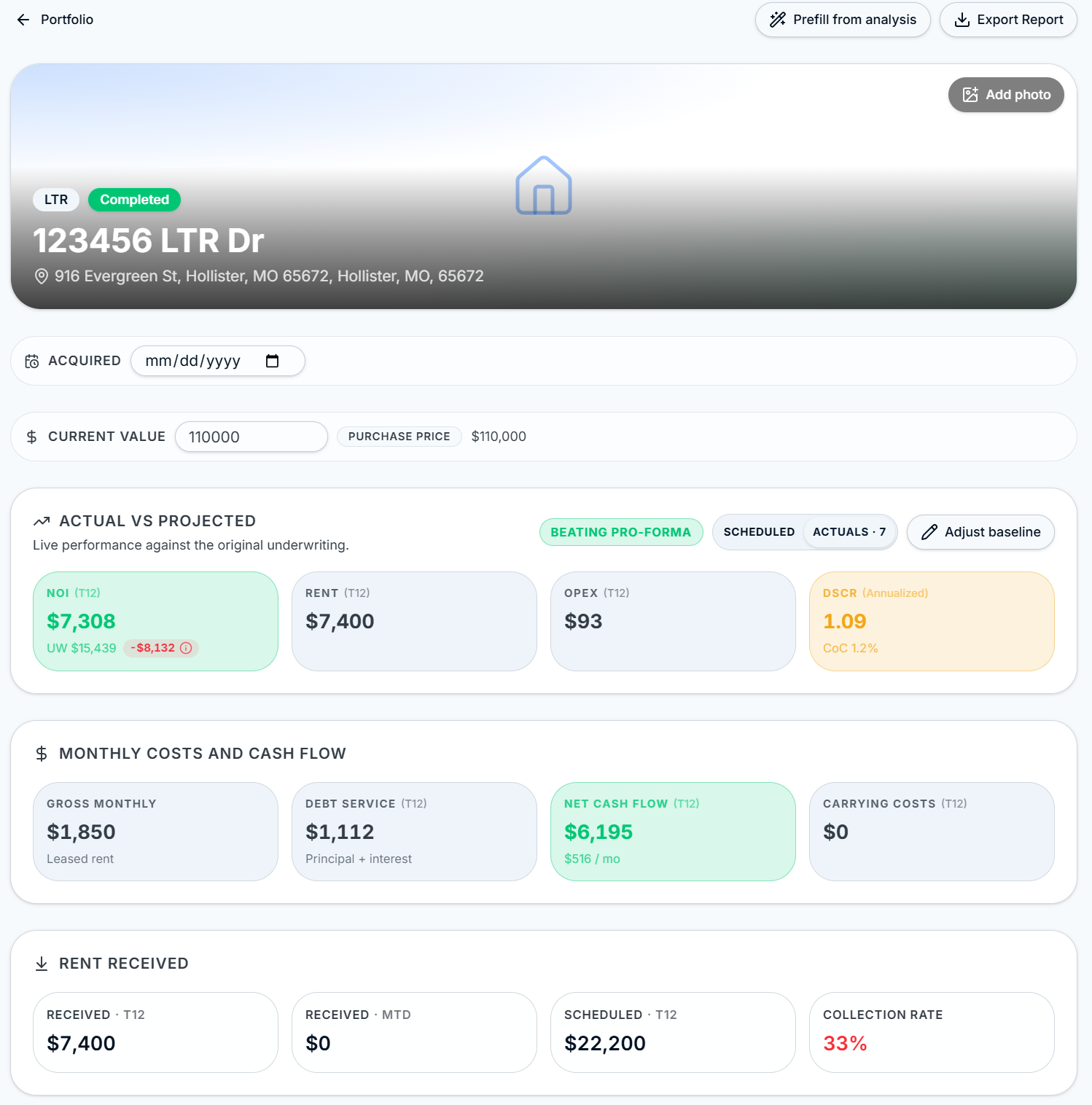
ROIStack Ownership page hero with Actual vs Projected, monthly costs, and rent collection tiles

Hero + Actual vs Projected + monthly costs + rent collection.
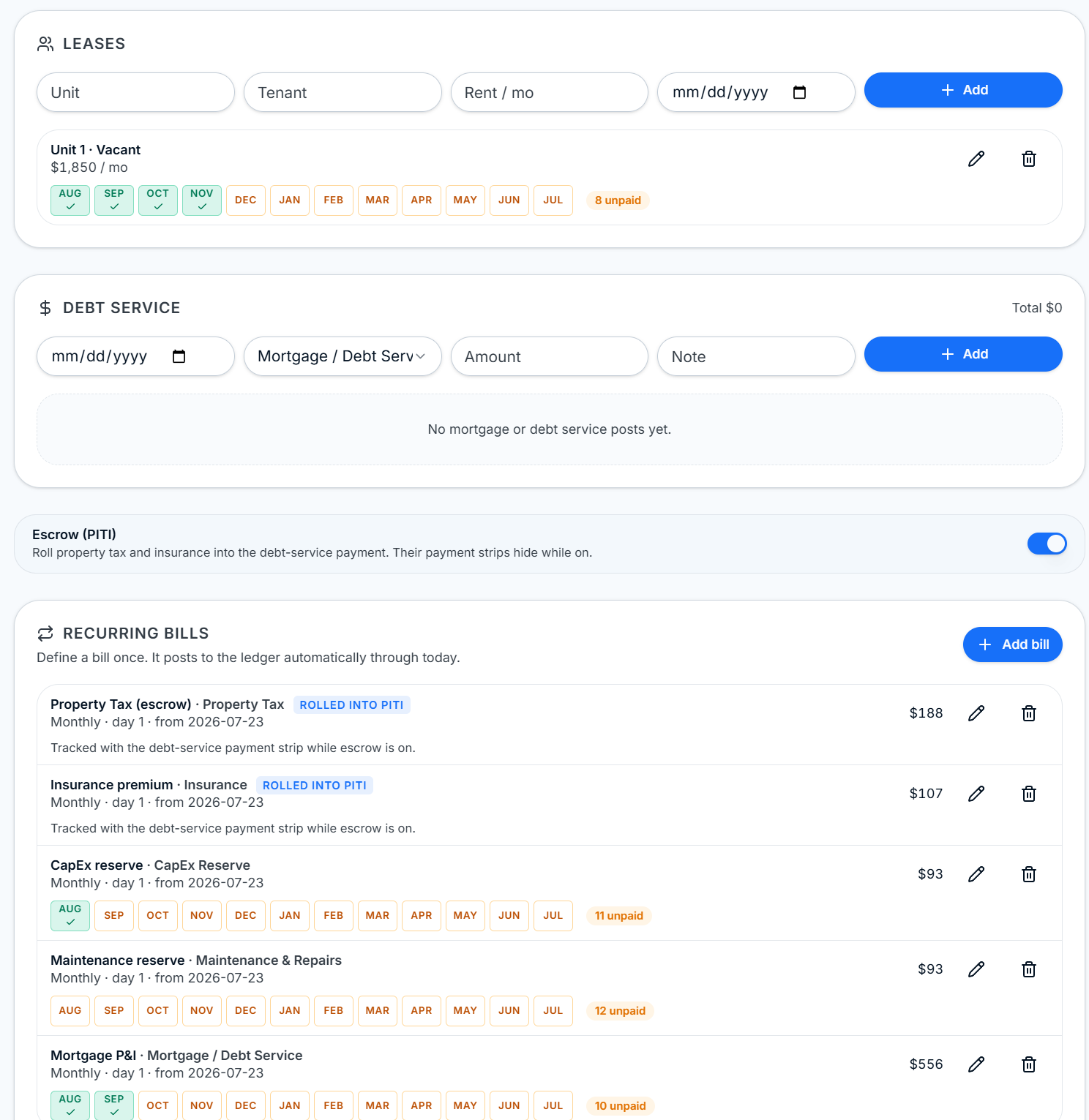
ROIStack Ownership page leases, debt service, PITI escrow toggle, and recurring bills with monthly payment strips

Leases, debt service, PITI escrow, and recurring bills with mark-as-paid strips.
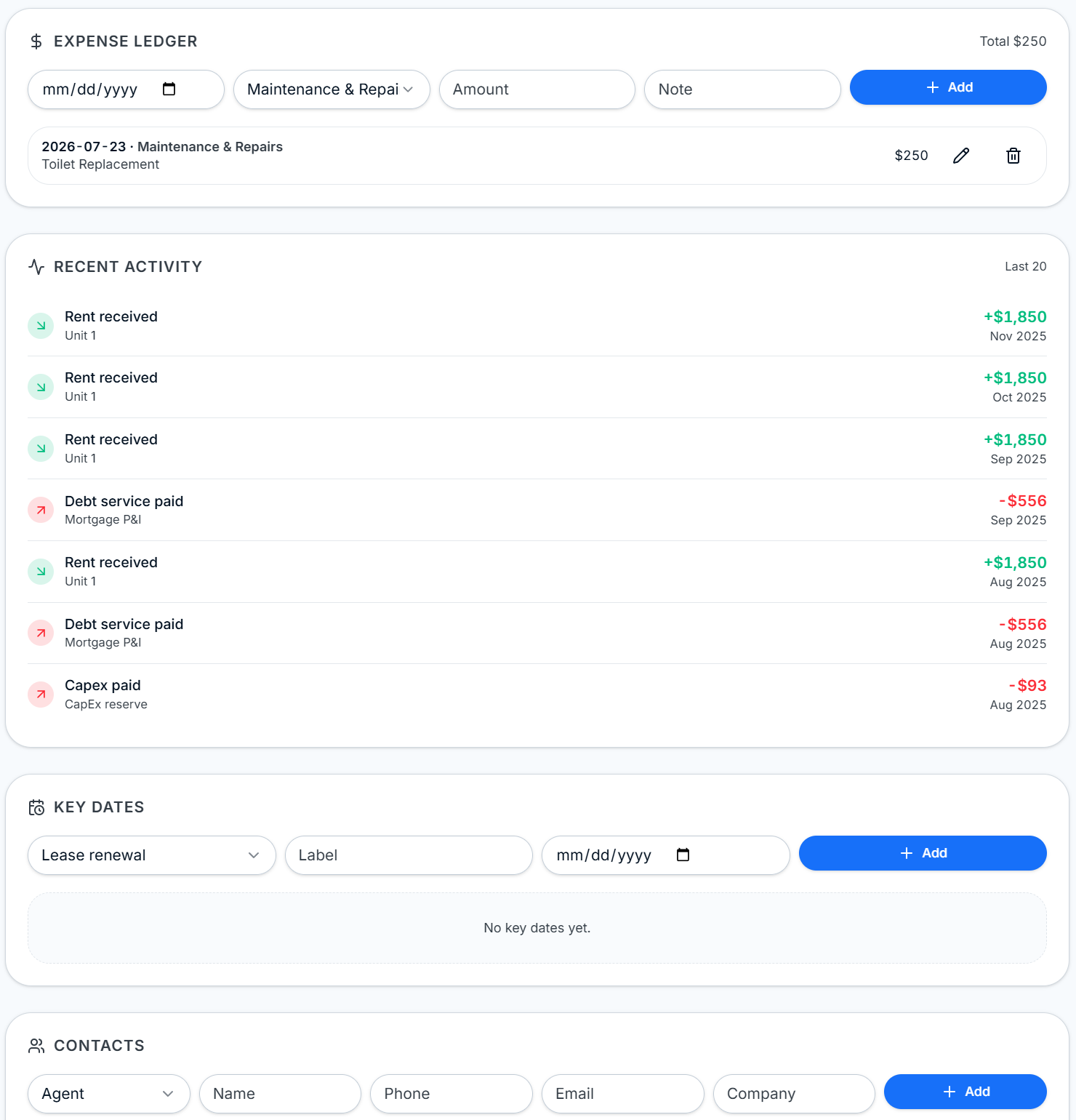
ROIStack Ownership page expense ledger, recent activity feed, key dates, and contacts

Expense ledger, recent activity feed, key dates, and contacts.

Quick-Add Wizard

Add a property you already own in three steps.

Skip the underwriting flow when you're logging an existing asset. The Add Existing Property wizard collects the basics, the baseline, and a recurring-cost seed, then drops you straight into the Ownership page with real numbers on day one.
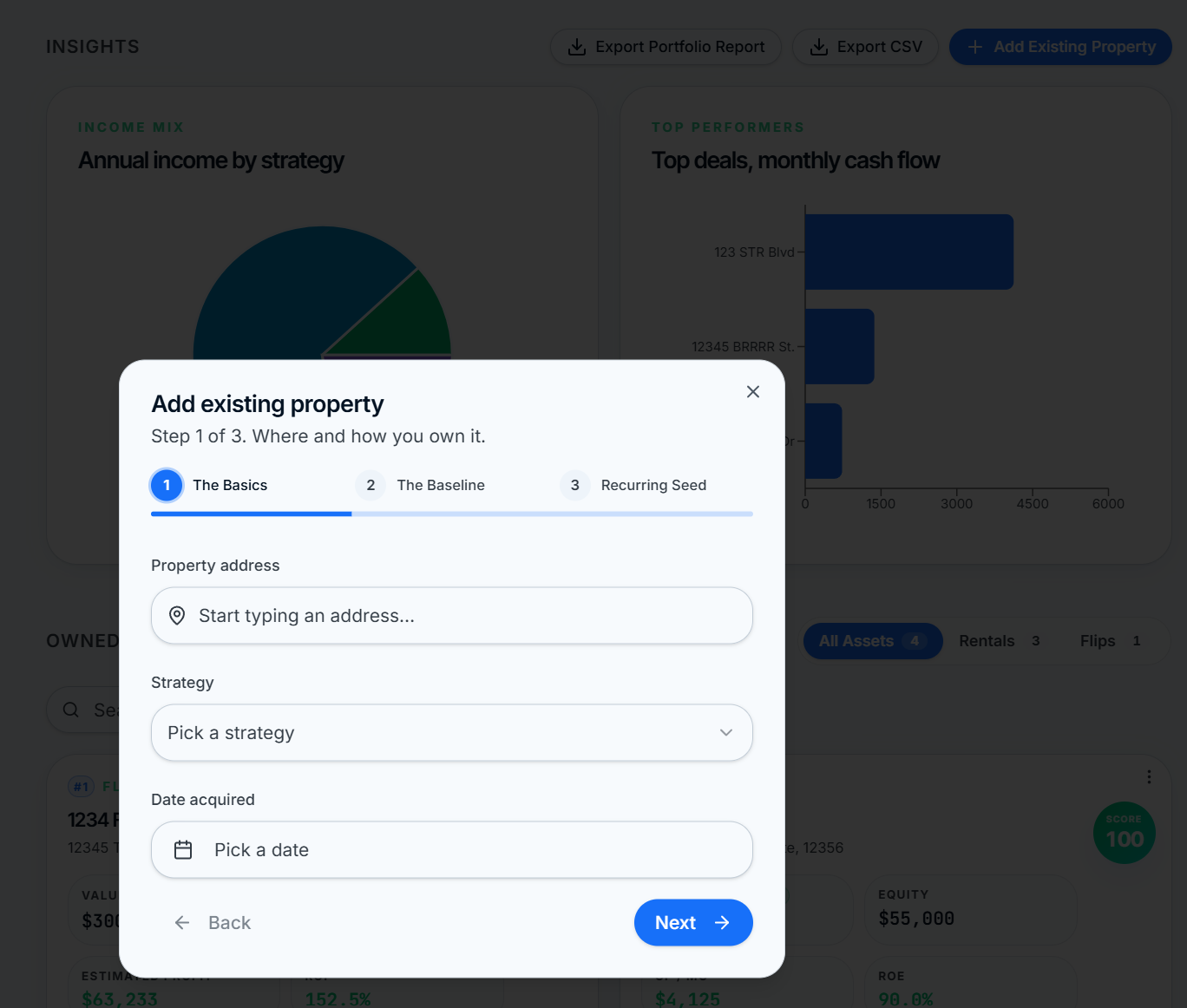
  • Step 1 — Basics: address autocomplete, strategy, and date acquired
  • Step 2 — Baseline: strategy-aware money-in fields (rent per unit, ADR/occupancy, ARV)
  • Step 3 — Recurring seed: mortgage payment, taxes, insurance, and known monthly bills
  • Multi-family aware: 1 to 4 units create a lease record per unit
ROIStack Add Existing Property wizard, Step 1 of 3, with address, strategy, and date acquired fields
Buy Box + Saved Searches

Set your criteria once. Every new deal is graded against it.

My Buy Box holds global defaults plus per-strategy playbooks for STR, LTR, BRRRR, and Flip, and a Rehab Price Book for your local costs. New deals inherit the right numbers automatically, so you stop retyping 20% down, 7% rate, 5% vacancy, and 2.4% closing costs on every analysis.
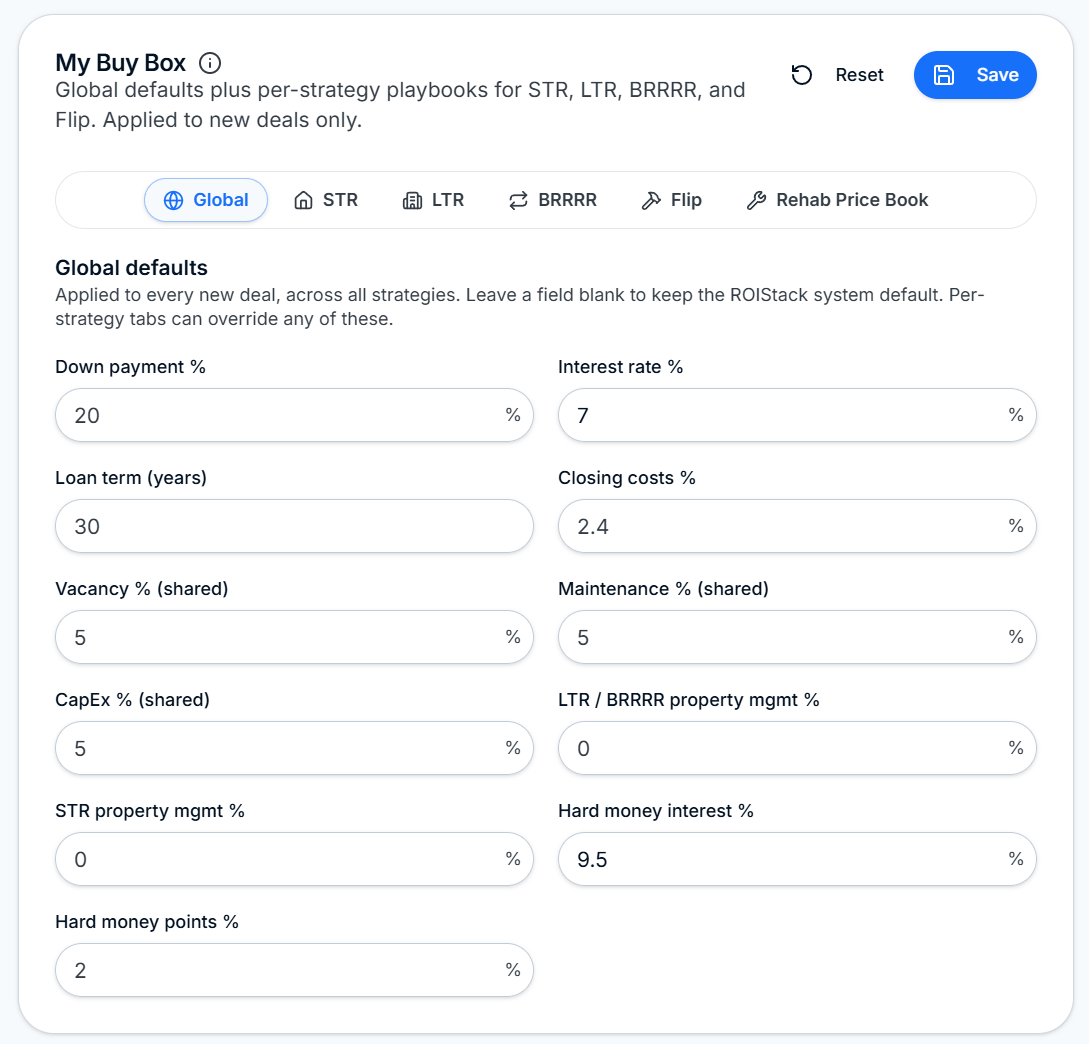
  • Global defaults: down payment, rate, term, closing, vacancy, maintenance, CapEx
  • Per-strategy overrides: STR, LTR, BRRRR, Flip each with their own playbook
  • Rehab Price Book for your metro so scope of work matches local reality
  • Applies to new deals only. Existing deals stay untouched
ROIStack My Buy Box with Global, STR, LTR, BRRRR, Flip, and Rehab Price Book tabs and default underwriting fields
Branded PDF Memo

A lender-ready deal memo in one click.

Every deal exports to a branded ROIStack PDF: score header with verdict, executive summary, key metrics grid, and full underwriting detail. Same chrome across Personal, Investor, and Portfolio reports so partners recognize the format instantly.
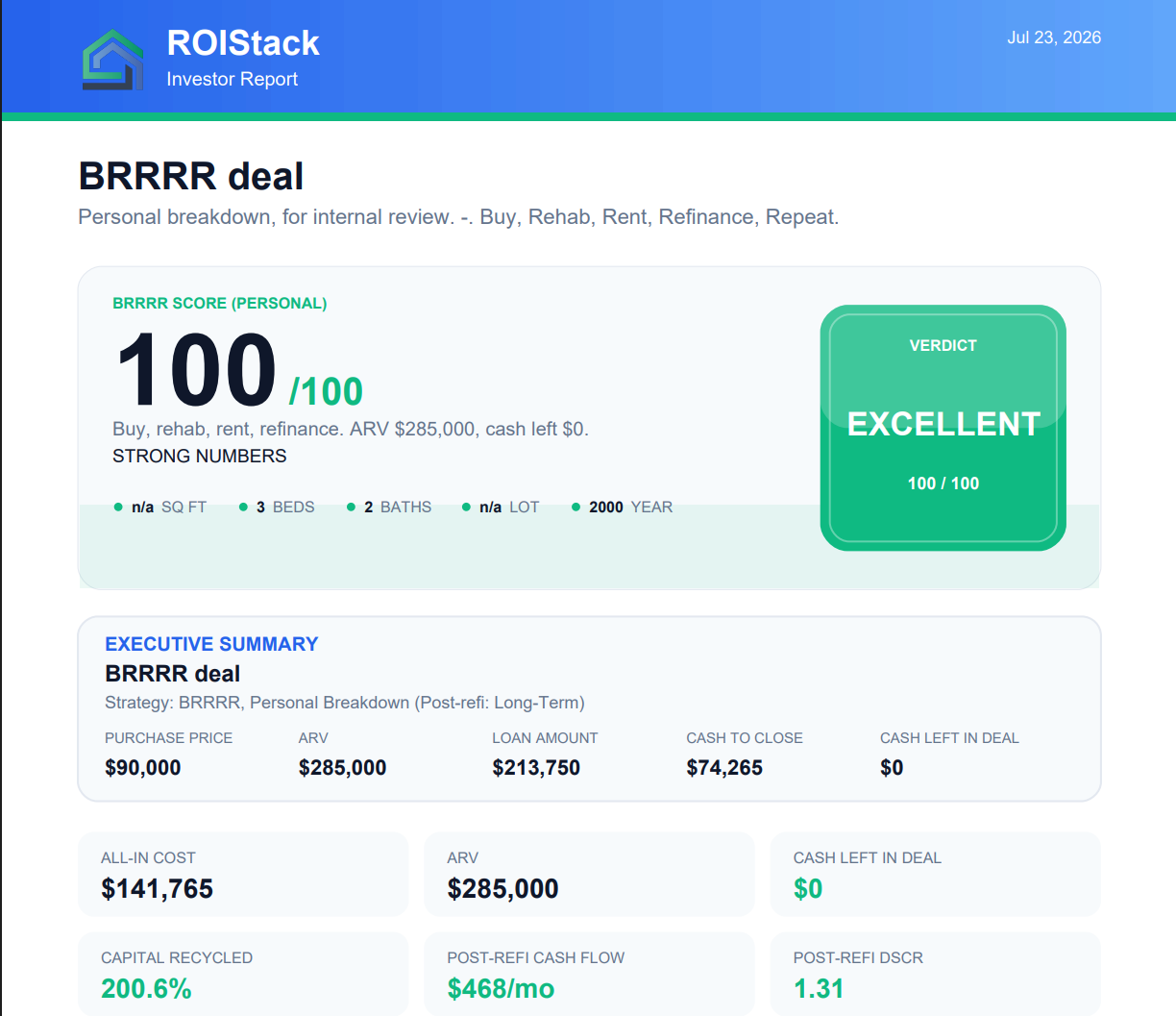
  • Score header with verdict chip and property snapshot (beds, baths, sq ft, year)
  • Executive summary tile: purchase price, ARV, loan amount, cash to close, cash left
  • Strategy-specific KPI grid: all-in cost, ARV, capital recycled, post-refi cash flow, DSCR
  • One-click export from Omni, Portfolio, and Compare
ROIStack branded Investor Report PDF for a BRRRR deal with 100/100 score, executive summary, and post-refi KPIs
Every strategy

One property, four strategies, modeled the same day.

Enter the address, price, and rehab once. Switch strategies without re-entering a single number.

Short-Term Rental

Model ADR, occupancy, and turnover

Revenue from ADR times occupancy, with cleaning, supplies, management, and furnish-out treated correctly.
  • Seasonality and cleaning cost breakdown
  • Furnish-out budget as a capex line, not opex
  • Amenity uplift modeling (Pro)
Short-term rental analyzer with ADR, occupancy, and monthly cash flow
More tooling

Built for the way you actually work.

The polish around the analyzer. Small features that compound.

Sensitivity Tornado

See which assumption breaks the deal, ranked by impact on cash flow and IRR.

Branded PDF reports

Lender-ready PDFs in one click. White-label branding on Pro.

Saved deals & portfolio

Pipeline board (lead, analyzing, offer, owned) with portfolio-wide rollups and Pro stress testing.

Deal Score

A 0 to 100 score per strategy, tuned to LTR, STR, Flip, and BRRRR.

Offline-first PWA

Install to your home screen. Analyze in poor signal, sync when you reconnect.

Pro

Rehab Walkthrough

On-site checklist inside Omni-View. Tap items and the rehab budget and ARV update live.

Pro

STR Amenities

Model ADR uplift from hot tubs, game rooms, EV charging, and more. Applies live inside the Omni-View STR tab.

Stop spreadsheet-juggling. Start underwriting.

Free to start. Every strategy, every metric, every deal in one place.